Every once in a while you might need to write a bash script that needs to prompt user for some input (for example name, path, search keyword, etc..) and then process it. The easiest way to do this is to use the read command:
#!/bin/bash

read -p "What is your username? " -e input

echo Your name is $input
Sometimes however you want to be more fancy than this and use something more graphical to pretend that you are user friendly. The most basic application here is the ncurses based dialog:
#!/bin/bash

dialog --inputbox \

"What is your username?" 0 0 2> /tmp/inputbox.tmp.$$

retval=$?

input=`cat /tmp/inputbox.tmp.$$`

rm -f /tmp/inputbox.tmp.$$

case $retval in

	0)

		echo "Your username is '$input'";;

	1)

		echo "Cancel pressed.";;

esac
Dialog sends the user input into STDERR instead of STDOUT so you can’t easily pipe it, or capture it. Best way to deal with this is to redirect it into a file, and then read it in. Not the most elegant solution but it works. You can test the exit status (in bash stored in $) to see which button was pressed.
The output looks like this:
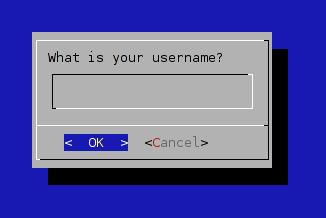
click to enlarge
Xdialog is a GTK based drop-in replacement to dialog. We can easily reuse the code above and have a nice graphical window popup:
#!/bin/bash

Xdialog --title "INPUT BOX" --inputbox \

    "What is your username?" 0 0 2> /tmp/inputbox.tmp.$$

retval=$?

input=`cat /tmp/inputbox.tmp.$$`

rm -f /tmp/inputbox.tmp.$$

    case $retval in

        0)

              echo "Input string is '$input'";;

            1)

            echo "Cancel pressed.";;

        255)

            echo "Box closed.";;

    esac
It uses the same kludgy logic, but the output is way prettier:
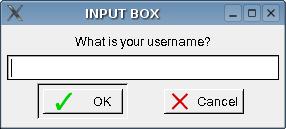
click to enlarge
If you want something more elegant, you want to use zenity. It also uses GTK to produce a nice looking dialog box, but unlike the previous two examples it sends the output to STDERR so you don’t have to screw around with the files:
#!/bin/bash

input=$(zenity --text "What is your username?" --entry)

retval=$?

    case $retval in

        0)

              echo "Input string is '$input'";;

            1)

            echo "Cancel pressed.";;

    esac
The dialog itself is similar to that of Xdialog, but I think the ease of use makes zenity a much more desirable option:
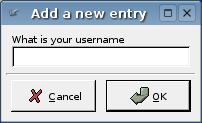
click to enlarge
In most cases zenity would be your best bet. But in cases where you know that X may not be running you should probably use dialog. The plain old read command may be the simplest choice, but it might confuse some users.
[tags]dialog, xdialog, zenity, read, bash, shell, shell scripting, scripting[/tags]
I tried the Xdialog example above, but it doesn’t work. After correcting the code, adding a space right before the > character to avoid an Xdialog error, the file /tmp/inputbox.tmp.$$ is created, but it remains empty. If I run the script and type Hello in the input field, the script outputs:
Hello
Input string is ”
I ran the script from a virtual console.
OS=Ubuntu 8.10.
bash –version gives this info:
GNU bash, version 3.2.39(1)-release (i486-pc-linux-gnu)
Copyright (C) 2007 Free Software Foundation, Inc.
Have anyone actually tested this? I have seen this method described on several sites now, but I just can’t make it work…
One site claimed that this is possible:
input=`Xdialog –bla bla bla`
but of course that failed too…
I found the answer. It was right there in the man pages. This works:
Xdialog –stdout –title “INPUT BOX” –inputbox “What is your username?” 0 0 guraknugen > /tmp/inputbox.tmp.$$
This also works:
input=`Xdialog –stdout –title “INPUT BOX” –inputbox “What is your username?” 0 0 guraknugen`
This is nicer I think, since there is no need for temporary files. Makes the code more compact. :)
So the answer was to add –stdout to the command.