Yesterday I felt like crap. I haven’t been getting much sleep lately so I decided to call it a night and went to bed early. I think I fell asleep the instant my head hit the pillow. Only to be brutally woken up 2 hours into my nap, by freaked out Ark.
Apparently he decided that someone is hacking us, and that I need to get out of bed and do something. I decided that best course of action would be for me to go back to sleep and for Ark to STFU, but he was not happy with that. Sigh… Apparently he was sitting there watching a movie, when all of a sudden the the 2 windows boxen in the room decided to reboot simultaneously. At that point he was ready to run upstairs to disconnect the cable modem and kill the wireless.
So I dragged myself out of bed, logged in, pulled up the Event Viewer and showed him this:
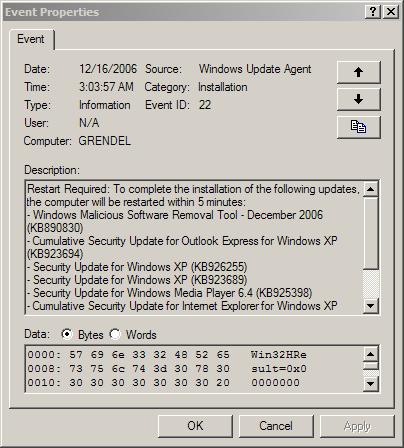
Apparently Microsoft decided to push one of their mandatory install automatic updates at 3am today. It doesn’t really matter that both machines were set up to “download and then prompt for install”. They still went ahead and did it. Ark was like:
“Dude, they can just remotely reboot your machine like that?”
Yeppers – gotta love Microsoft for that. This is one of those friendly reminders that you don’t really own a windows box. You lease it from Bill Gates, and he is the one who can decide when it is best to install OS upgrades – not you. Funny how that works, eh?
But this is nothing. Just wait to see what Vista will be able to do without your permission!
[tags]windows, windows updates, xp, security updates, microsoft, forced reboot, forced updates[/tags]
Umm.. so YOU left the “allow automatic updates” setting to be on, and if you look at the Automatic Updates control panel applet you’ll see that 3AM is the default time to run and install them.
You could, of course, choose the “Download the updates but let me choose when to install them” option instead.. or even the “don’t update automatically” bit.
marty
You know what, I think you are right. I was a 100% sure I had it set up to “download but let me install” but now that I checked it, it is on the 3am schedule. Funny thing, I don’t remember ever switching that setting.
Oh well. May main point was that my brother nearly got a heart attack thinking we are getting haxx0red. :P
Automatic Updates… grrrrrrr
That has been annoying the hell out of me recently – keeps asking to reboot over and over again. There really should be a “fuck off, I’ll reboot when I want to” button instead of just “yes” or “later”. (Apparently “later” is code for “I’m too retarded to make a proper decision, come back and ask me again in 5 minutes”)
Having had this happen only last night, I now see the obnoxious yellow exclamation mark thing in my systray again with more updates waiting to be installed :evil:
You can change this using Group Policy under MMC. You can change the default settings for reboot reminder and for mandatory reboot.
I have XP home on this box, so no goup policies. But as always you can just set it in registry.
Thanks for sharing. I promptly put a copy of this blog in my “Why I bought a Mac” file.
Hi,
I got exactly the same problem and I can tell you the settings for automatic update on my computer had always been set to “Notify me and don’t autmaticall download or install …” but they have changed now to “Automatic” and it was definitely not me who changed it. I realised the change approx 2 weeks ago but actually it may have changed earlier.
My first idea was “it must have been Bill Bates” who else could have done it?
Regards, Mike