Can someone explain to me what is the purpose of this adapter?

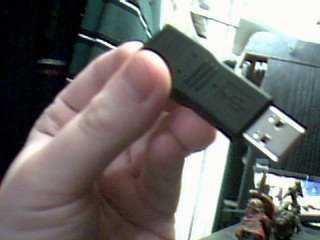
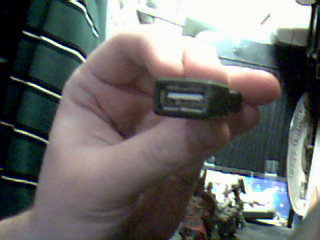
I found it in my pile o’ random parts at work. There are no markings on it – no brand, no serial number, no nothing. It only has the USB symbol on both sides. I have bunch of the USB to PS2 adapters which are about the same size and shape. I have also seen the much less common, but much coveted by some users PS2 to USB adapters.
But what is the point of USB to USB? I just can’t figure this out…
As per Craig’s suggestion I ran lsusb on it – I got nothing. It did not detect any devices plugged into the USB port. Windows did not detect it as a device either. So it does not seem like it really does anything other than just being adapter.
[tags]usb, usb adapter, usb to usb, usb to ps2, ps2 to usb, adapter[/tags]
Maybe some extension for when you want to use a bigger usb stick, but no cables?
(Or maybe some data sniffer…:-/)
It’s in case one cord isn’t long enough (sometimes printers only come with cords that are a foot long :/) and you need to use more than one to connect.
And for jumping rope.
Is the connector a “straight-through” type? Might be of of those signal enhancers like you used to see on the end of USB 1.1 extensions. How about a pass-through dongle?
I know . . . some one made that just to stir-up controversy!
Is there a USB ID code on it (plug it in and check if the OS responds to it)?
In other words . . . NFC
*slaps forehead*
Put into a Linux system and run lsusb!
There are no markings on it whatsoever, but I haven’t tried plugging it into the system. I would imagine that keylogger or a sniffer would be slightly bulkier – there doesn’t seem to be much space in there for any circuit board. I will take a comparison shot of it next to a USB to PS2 adapter – they are almost the same size.
Craig – thanks for the suggestion lsusb it is. To bad I left it at home. :(
I will post lsusb output here when I get home.
I’ve found occasionally that something I’m plugging into a USB port (memory stick, cable, w/e) won’t fit because its too wide and there’s something else plugged into the port next to it
Maybe its to move the point of plug-in back a bit to avoid that kind of situation – get it to the point where a cable in the other slot is able to bend away and let you plug in your fat flash drive
Could be – that would be the simplest solution I guess. Although most of USB plugs are relatively slim and skinny at the base – cause the manufacturers know those USB ports are usually like 2 milimiters away from eachother.
Also like Jenn said this might be like a conector kinda thing. Hmmm… Then again, if you were making a little conector thing, wouldn’t you make it female-female? Usually most USB cords are either male on both sides….
Actually now I think about it, the problem computer in question (not mine, in a school library) had a really big fat cable in another slot, I think for the monitor, that was big enough to block access to the USB port
very annoying :x
Does it have a notch in the middle of one of the long sides of the female side? Some old USB keyboard cables (Macs?) had a extra ridge in one side that kept them from being put anyplace other than directly into the back slot of the computer. The ridge kept the cable from fitting into a standard USB hub or other external devise. This could be a way of getting around that…
hdw – nope no notch. It seems that it indeed might just be a plug “slimmer”.
Craig – I ran lsusb on it, and it gave me nothing. It’s acting as if nothing was plugged into the USB port.
Jenn wins, its for extending the length of a USB cable. At least that is what i have seen those for.