I discovered a very nifty tool today – a mini SFTP server for windows made by Core FTP. The whole tool weighs in under 780 KB, requires no installation and gives you a bare minimum SFTP functionality.
Simply run the application, specify a desired username, password, the folder you want to be made accessible via SFTP, port on which the server is supposed to listen and hit start. That’s all there is to it.
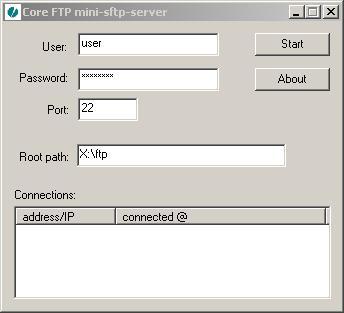
The application can be minimized to tray via the window option menu (accessible the top left corner) so that you can just leave it running in the background.
If you want to skip pressing the start button, and launch the app while already running you just execute it with the -start attribute:
msftpsvr -start
You can create batch file, and throw it in your start folder or create an auto run registry key to do this on startup for you.
Here is a direct link to the executable: [download msftpsvr.exe]
I think this is a perfect tool to put on your USB stick. It’s easy to use, easy to deploy, and relatively secure (safer than regular FTP). It’s an ideal app for transferring files over the internet in emergency situations.
Core FTP also offers a full server solution with multi user accounts, quotas and etc. It supports SSL/TLS (FTPS), SFTP (SSH2), and clear FTP modes. You can download it from here.
The website claims that the software still under development and it is free to use at present. They also seems to have a purchase link that allows you to buy the application. I’m guessing that the server download might be a shareware with a limited time trial period, but I couldn’t find any licensing info on the page, so go figure.
After some more testing, this software appears to be really buggy. I wasn’t able to upload to the server when using sftp:// from within Konqueror. The command line sftp worked for the most part. When I tried using WinCSP or OpenSSH scp app, my connection kept dropping in the middle of uploading files. I’m not happy with it.
Anyone else experienced something simllar?
[tags]core ftp, ftp, sftp, ftps, ftp server, sftp server, msftpsvr, server[/tags]
I must say from experience that SFTP often causes issues. A friend of mine used to run a “warez” server using sftp instead of ftp (keeps V&@bay, lolz.) Shanyways, the downloads would crap out all the time. Of course, we are talking about large downloads here. Scp and sftp are great for sending information that needs to be kept hidden but even still, 4 years later or so, I find that SFTP with many clients still leads to drops and such.
You could try OpenSSH on windows through cygwin or standalone. Why were you trying to run an SSH/SFTP server anyway, just haxin’ around?
//Dan
Yeah, just screwing around. I figured I might set up one at home so that I can just drop files that I may or may not need in there, and have a quick and secure access to them from anywhere.
I have a full blown Cygwin, so I have set that up instead. I tried that in the past, and I had major issues with it. The service was crashing and restarting 2-3 times a day for me, so I disabled it.
I did set it up again, and went through some extra steps to make sure nothing conflicts with it. So far it only spammed my event viewer with strange warnings about sshd not being able to find registry keys. I’m still trying to figure out what this means.
Some mailing lists archives I found suggested to adjust permissions on the stuff in /sbin and /bin cygwin directories. Let’s see if that works…
Meh… I guess the best way to do this with a windows machine is to VPN in and then mount a network share. But, seeing how I still can’t VPN to work from MSU I figured this could work for accessing shit at home…
FTP Manager Lite is a better freeware FTP and SFTP client software. The clean interface is super easy to use. It will perform your files transfers quickly and efficiently. It is one of the best freeware FTP clients that also supports FXP.
Good replacement for Core Free SFTP server might be Rebex Tiny SFTP sever. It’s also free and can be downloaded from http://labs.rebex.net/tiny-sftp-server/.