I’m continuing to mess around with Ruby on Rails on WinXP. I just ran into another problem that took me over an hour to figure out. I set up a database in MySQL, configured my database.yml file, created a model and a controller and launched WEBrick. I put the scaffold line in the controller to generate auto-magical interface and I kept getting this error message:
#28000Access denied for user ‘root’@’localhost’ (using password: NO)
RAILS_ROOT: ./script/../config/..
This was driving me crazy, because my yml file specified to use the “webuser” account instead of the root. And yet, rails insisted on fucking around with the root account. I checked it about a hundred times, changed access privileges on my table every possible way, and scoured the web for similar problems. It seems that quite a few people are running into the same damn issue, and almost no one knows hot to fix it.
Finally after reading through the comments here, I found the solution. Simply run the server in production mode:
ruby script/server -p80 -environment=production
This worked for me just fine. I’m not sure why this was happening. Any ruby experts out there can explain this behavior to me? Oh well, for now I guess that as long as I stay in production, I can avoid that stupid error.
Btw, rails is pretty amazing when it works. It only takes one line of code, and you get a simple, yet surprisingly custom complete interface allowing me to populate, edit and remove stuff from your database table:
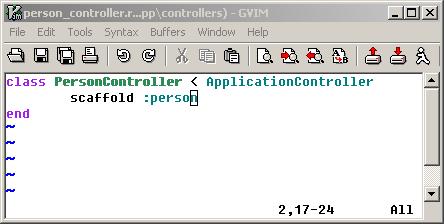
How awesome is that?
[tags]ruby, rails, ruby on rails, production webrick, saffolding, access denied, rails issues[/tags]
Thanks a ton. You saved me an hours worth of headache figuring that one out.
Glad I could help. :) I still have no clue what causes this to pop up in the first place.