I just found Freetalk – a tiny console based Jabber client. I love it! It has almost no memory footprint, it doesn’t steal focus like some of the GUI apps and (which is possibly the bast part) it doesn’t look like an IM client:
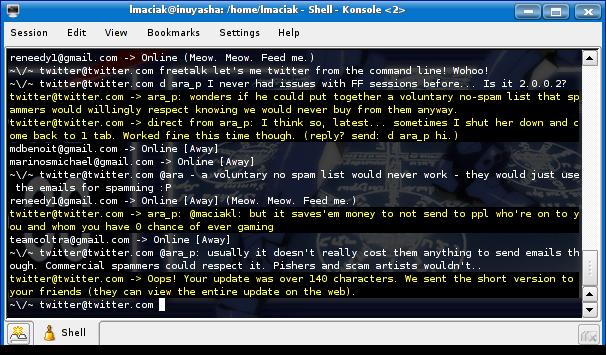
Someone watching you from a distance would probably think that you are diligently doing something in bash. This makes it an ultimate client to use at work to inconspicuously talk to your GTalk friends or send and receive Twitter updates. :mrgreen:
I had only one issue with it. On the first run it barfed out on me giving me a screenfull of errors. Then I did /setup to create a new .freetalk folder shut it down with /quit and when I started it back it prompted me for my jabber id and password and connected without any problems.
Here are few tips that might not be entirely obvious at first. To send a message to someone, simply start with their full jabber ID (including server) like this:
someone@somewhere.com you suck!
Remember – the “you suck!” part of the code is vital. You must include it with every message. ;) Freetalk will actually copy the username for you on subsequent lines so that you don’t have to type it all the time. To send a message to someone else, simply backspace few times until you delete the name, and put in a new one.
To set your status use the /status comand:
/status [Away]

/status ZOMG! Lion! Get in the car!
Not sure if there is a windows version (probably you could get it via cygwin), but on Ubuntu just search for freetalk in apt repositories.
[tags]freetalk, jabber, gtalk, twitter, im, instant messaging[/tags]
I compiled freetalk on my Solaris system and was impressed. This will come in handy when I am using dial-up and ssh to reach my hosts. I usually use GAIM, since I also use a Lotus Sametime and Yahoo IM server at work.
I have been using IM to communicate more and more at work. I was kinda scared of it for many years. I recall all the vulnerabilities in IRC and kept correlating the two. GTalk has become my preferred IM since it keeps a copy of my conversations in my mailbox and can be searched easily.
Here is an idea . . . run freetalk in a screen session. Then typing twice will bring you to a different TTY. Instant boss button!
I think wordpress ate some bracket characters. But yeah, excellent idea. You can quickly do [CTRL+A] [CTRL+D] to detach the session. Then you can reatach it by typing screen -x sessioname :)
Stupid HTML . . .
That was ctrl-a twice.
But . . . you already run screen, so you know! :-D
Yeah, I’ve been using boss keys more often now. Looks like a nice one progy. Thanks for the tip Luke.
Out of the popular IM protocols I think I like GTalk the most because it is relatively open, Jabber based, and the windows client really has that Google touch – simple yet efficient.
A lot of people I know prefer AIM though. AOL actively tweaks their protocol all the time to break the 3rd party client functionality, and their own client serves annoying ads. AIM used to be THE IM protocol. Now, with the bloated client, and ads I’m not that sure anymore…
If you like freetalk, check out mcabber: http://www.lilotux.net/~mikael/mcabber/
Its a very complete ncurses jabber client, I just love it!
Freetalk seems useful aswell though.
Thanks for the tip John. I will give it a try. I picked freetalk because of it’s simplicity. Mccabber looks like a really good alternative though.
Odd… Twitter no longer seems to accept my IM’s from freetalk. They go through, and get stored in my Gmail account, but Twitter doesn’t update.
GTalk seems to be working fine. Anyone had a similar problem?
I had Twitter as a “buddy” in GAIM and noticed it goes up and down during the day. I removed it yesterday because of all the sound events it kept triggering.
I just tested it, and I can chat to other GTalk users normally from freetalk. So I guess it is Twitter’s fault.
Pingback: Terminally Incoherent » Blog Archive » A day without X

I’d like to know how one gets a message. Is that what “iq received: (unhandled yet)” is trying to tell me? The reason I ask is that in an hour of searching the net I have yet to find the answer. The man page makes no mention of how to use the program, but it is still the best looking client I have come across so I really want to use it.
BTW: Your post is the only place on the internet which mentions how to send a message with this program. :)
Freetalk is a misunderstanding. At first I thought ‘Ah, nice, something like bitchX, want one!’, but then:
– there is no way to stop chatting with anybody – if I chat with someone, only way to change buddy with who I’m chatting is… closing the program. But this is really nothing, as….
– there is no exception handling! Any error in any internal command (!) equals leaving program! If I make any mistake, I need to turn program on one more time.
I really respect amount of work program’s author put into developing Freetalk, but seriously, the program should be distributed with ‘AMATEUR DEVELOPMENT!’ label on it.
The fact that the original developers didn’t see fit to write as much as a paragraph to help someone use the program does say something about their interest in the project. However, at this point I don’t think we can blame the developers since I think they stopped 8 years ago. My beef would be that Freetalk is still in the Debian and Ubuntu repositories.
I just came back to this blog while searching for additional information on the net but there is still more here than anywhere else. I wish someone would either put a bit of effort into this program, or develop another one like it.
Here is another alternative Jabber / XMPP console based client.
http://blog.amolbhave.in/computers/jabber-xmpp-console-based-client/