After all that supposed data loss excitement I have launched Freelancer to play for a bit. I immediately noticed that I was sitting in a shitty light fighter ship, and recalled that I was working toward a nice heavy fighter available on a battleship stationed nearby. I checked my funds and I only had about $23k. The ship I wanted was in the $80k range. That meant many repetitive pointless missions, or hours of flying doing trade routes. I just wanted to skip to the next story based mission for some exciting, scripted combat sequences.
So I started digging in the guts of the game. I checked some modding tutorials, and found that the prices of goods sold all over the universe are stored in a single file called goods.ini. I figured out that I can change prices of some goods to make my trading quicker and easier. I quickly located it, but unfortunately it was a binary file that could not be edited by hand… Or could it?
It turns out that the huge Freelancer community created a tool to modify these files quite easily: BiniQDU. You install it, then launch it, open an ini file of your choice and edit away. It even provides nice syntax highlighting for your convenience:
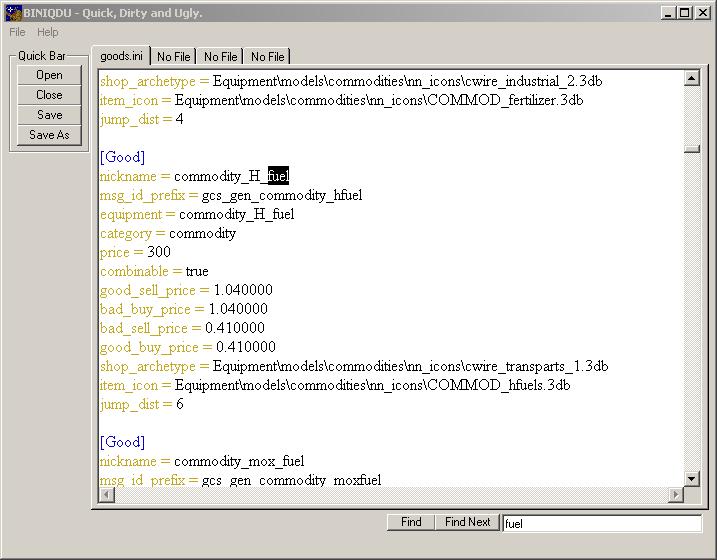
I peeked what I had in the cargo bay: bunch of H-Fuel cells. I closed the game, launched the tool, found the entry titled h_fuel in goods.ini and changed the price attribute to 10,000. You will also notice that below price, there are some other attributes which are, I think multipliers to price. The station where I was happened to have a bad sell price, so it got multiplied by the bad_sell_price attribute which was set to 0.41. When I went back to the game, I only got about 4,100 per unit. Still, with 20-something units in the cargo bay, I ended up with only few thousand credits over the 80k that I needed to get the better ride.
After I sold the fuel, I closed the game, went back and changed the price of H-Fuel back to 300 in case I planned to trade normally in the future. Of course if I wanted to I could have set the price of a single unit to 100,000,000 and never again worry about money. But that could make the game boring down the road, so I opted not to.
So I was still broke, but this time with a better ship. :) Now I’m tempted to explore all the other files, and see what else can I modify. From what I know, in this game, sky is the limit.
Btw, the goods.ini file can be found in C:\Program Files\Microsoft Games\Freelancer\DATA\EQUIPMENT\
[tags]freelancer, biniqdu, modding, games, gaming, cheat, freelancer cheat, free money[/tags]
Thanks Thats exactly how I feel! I played it all the way from scratch last time years ago. Now i wanna do it easy!
I tried to Download that program but it seems they took it off. Is there another way to get it?
aceinspect@Hawaii.rr.com
Thank you
Oh boy. It seems that Lancers Reactor went to shit. What a pity – it was an awesome site. I think they lost all the content. :(
Try this file front link. Just make sure you scan the file with AV or two before using it cause I don’t know the source of this one and I haven’t tested it.
Let us know if it worked. :)
WORKED, THANX
I wrote some bini editing tools a couple years ago called “binitools“. They weren’t the most popular tools, but you will usually find them in collections of Freelancer utilities.
Its a pure command line conversion tool, going back and forth between text (ini) and binary (bini). As far as I know these are the only bini editing tools under a free license (GPL in this case), so you can hack the source if needed.
Freelancer is a fun game, especially with friends. It had so much potential to be even better too.
Guys! I found a fresh link that works. If anyone still wants it. –>
http://maceratedgoth.tripod.com/freelancerfilehq/id1.html
you can use notepad++ to to open goods.ini
@ Oliver Hörberg:
Thank you so much Oliver Hörberg, I couldn’t find it anywhere else. Happy happy happy!
Didn’t work at all wouldn’t open that file
hello i have tried to open goods file in BiniQDU but there is no response the file is not opening in BiniQDU. how to open it correctly.