How do you control your background services in Linux? Purists will probably say that renaming the symlinks in the rc folders is the way to go, but for me that’s a pain in the ass. I much more prefer some simple app where I could just click bunch of check-boxes on a single page to enable and disable starting up of various apps at different run levels. KDE has a built in tool for this called KSysV but it’s UI is atrocious. I mean, please check out this screenshot and tell me – does that look like a clean UI design?
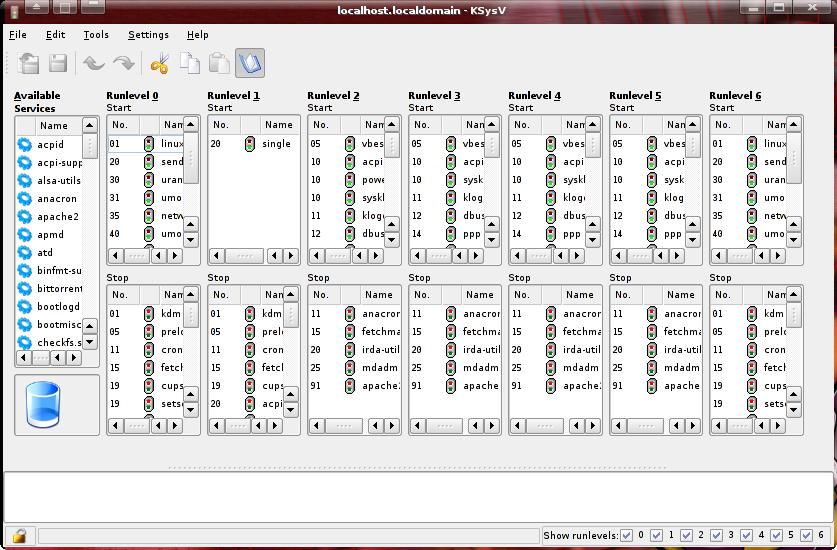
What the hell were they smoking? It actually takes you a minute or two to realize that you disable applications by dragging and dripping their respective icons to the recycle bin icon in the corner. I guess it makes management of the services a bit easier but it could be much cleaner.
I recently discovered sysv-rc-conf app that actually manages to nail the simplistic service management paradigm I was really looking for – by using freaking checkboxes:

It’s not often that a curses utility written in perl completely owns a polished KDE app on clarity, usability and UI design. But this is exactly what we have here. You don’t want the service to run, you un-check the box. No dragging and no dropping stuff between boxes, searching and etc. Just pick an app, go across and check or un-check boxes as needed. And if you want more control, just run it with -p and you will get into the priority mode:
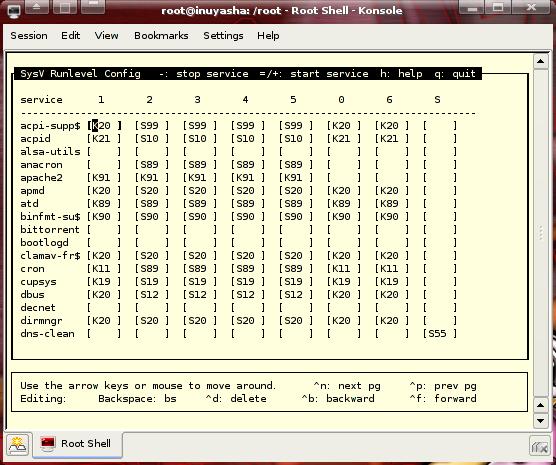
Here you can actually edit the K and S records for each app on each run level. Now, KSysV might have some a bit more functionality, but sysv-rc-conf is simple, powerful and easy to use.
My Dapper installation didn’t have it installed by default, but I found it in the universe/admin repositories. You can get it by doing:
apt-get install sysv-rc-conf
or
aptitude install sysv-rc-conf
What is your favorite tool for managing SysV stuff? Let me know in the comments!
The only Linux I really touch is Red Hat, so I just use chkconfig. Easy to script, easy to read. I am not sure what other distros use chkconfig
Yeah, it’s pretty much a Red Hat script. It’s not in the core Ubuntu package repositories. :(
[quote post=”1894″]Yeah, it’s pretty much a Red Hat script. It’s not in the core Ubuntu package repositories.[/quote]
Yeah but you are downloading sysv-rc-conf anyways. Might as well just grab chkconfig: LINKY
Only thing that worries me about compiling this from source is that Red Hat and Fedora have a slightly different ideas about runlevels than Debian and Ubuntu.
I might check it out on a test machine or in a VM. Don’t feel like b0rking my work laptop. :P
Makes a good excuse not to work though ;)
Then again . . . unless you are a sysadmin doing a lot of tests, you really should not be messing around with rc scripts much to begin with. If you have a fear of borking-up your system, you probably should not mess with it unless you have a good understanding of what you are doing.
Heh. That doesn’t stop me though. I b0rk my systems all the time, and I’m usually able to fix it.
It’s just I don’t want to deal with that at the moment ie. breaking your system because of tinkering is not an excuse when you are on a strict deadline. ;) So I’d rather use something that works, rather than something that may or may either work, or do some funny stuff I might need to fix.
Btw, I found like 15 services on my laptop that I didn’t really need to be running like apache, sendmail, bittorrent tracker, irda modules (I don’t use the info red sensor) and etc. It almost cut my boot time in half because all that crap is not starting up every time I power this thing on – so I’m happy.
“info red” LOL
Never thought of infrared that way.
LOL I can’t believe I actually typed that. :oops:
This is what happens when I don’t get my morning coffee.
Pingback: Terminally Incoherent » Blog Archive » Installing Fluxbuntu on Compaq Presario 1240

Yes, this is a good tool. I have used it before, albeit I am not a big fan of cursed interfaces. I think this tool is only pre-packaged for Debian though (Ubuntu gets it being Debian derivative), so anybody with Red Hat based system or some SuSe or Mandriva (could be considered RH based ;) ). Is a bit out of luck.
About chkconfig. It is a very Red Hat specific tool and it will NOT work on Ubuntu. The reason for this is that chkconfig relies on startup scripts having a lot of specific and properly formated information in their headers and will not work without them. Debian derivatives have a command line tool called update-rc.d to manipulate sysv startup. It doesn’t have listing capability though.
That’s what I thought. These kinds of things don’t port seamlessly between distros. Thanks for the info. :)
I’m the author of sysv-rc-conf, just ran across this posting. Glad you all like it. I thought I’d add to the discussion regarding chkconfig,
I also had used redhat and liked the chkconfig syntax. So, I built sysv-rc-conf to take the same command line arguments. You can check the man page for more details, but it allows you to modify run levels just like chkconfig without bringing up the TUI.
Ie.
sysv-rc-conf --level 2345 apache offCheck the USING THE CLI section of the man page for a bit more.Regarding compatibility, I admit I haven’t checked in a over a year, but I tested this app on a number of non-debian based distros and it worked, specifically I do remember testing with redhat. The COMPATIBILITY section of the man page gives more info on what to check for to see if your distro is compatible.
Hey Joe! sysv-rc-conf is really a great app! Keep up the good work.
I haven’t checked the CLI options but that really looks useful – especially for scripting. Thanks for the tip!
great review
It make things easier
Oh.Geeee.
that was not …..
Pingback: Resolved: Disable a service from starting at all runlevels? #answer #it #dev | IT Info

Pingback: Solution: Disable a service from starting at all runlevels? #fix #development #answer | SevenNet
Pingback: Solution: Disable a service from starting at all runlevels? #programming #solution #it | Good Answer
