This really cracked me up. Apparently someone got fed up with asshole neighbors leaching off their wireless connection. So they did the only thing they could possibly do:
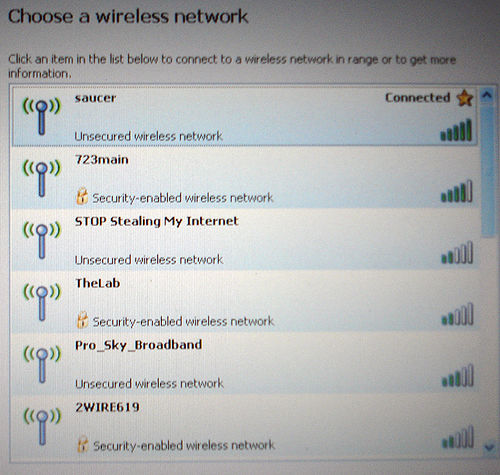
I really find it incredible that this person had enough know-how to actually go in and change their SSID, but not enough to actually click on the security tab and set up some sort of encryption. Seriously, how does that happen? This is so monumentally stupid that I’m actually suspecting it might be a honeypot.
I mean, if I decided to set a trap to pwn Wi-Fi leachers I would probably call it something like that. Either way, it’s amusing. Credit for finding this gem goes to passiveagressivenotes.com.
[tags]wi-fi, wifi, wireless, wi-fi security, wireless security, internet, stop stealing my internet[/tags]
That is indeed odd.. it ought to be easier to find how to set up some security than to change the network name…
They could be using MAC address filtering – many routers have an option to only allow certain MAC addresses to use the network. Of course, encryption is a must-have, otherwise people could just sniff your packets, but MAC address filtering does stop (most) amateurs from stealing WiFi ;)
Yeah, but if they were using MAC filtering, would they change their SSID to that?
We used to have an open network share on the backed up server. If you wanted your files backed up, you’d make your own folder and store whatever in it. Of course, by default, it was viewable to anyone (our new system is a public share and everyone gets a personal private folder as well)
I made a folder called ‘do not look in here’ and a text file inside called ‘do not read this.txt’, which contained the words ‘Couldn’t help yourself, could you? So much for trust’.
I’d love to know if anyone ever looked at that file. I doubt it, most people ignored the network for non-work use unless they were searching other people’s music caches.
I am running a bogus access point at my house. I see a lot of people connect to it and try different hacking tools to try to break what isn’t there. It provides quality entertainment for me.
Hahaha! Brilliant! That will definitely stop people from “stealing his Internet” as he had so eloquently put it.
It’s like not putting locks in your house, but put up lotsa signs saying “Stop burglarizing me!”.
Actually, it is pretty much what my own WiFi connection looks like (without the stupid name). Because I have set it up for the MAC addresses in my network. Of course, packet sniffing is probably still possible, but my neighboors are old people who don’t really give a damn.
@Craig – LOL!
@Alphast – MAC filtering is better than nothing. Your neighbors may not care, but you never know about wardrivers. Then again, unless you are like the only unsecured Wifi connection in miles, they will probably just skip to the next one.
That’s nice, but MAC address can be spoofed as well. Don’t leave things up to chance.If you want to keep your stuff private, take the necessary steps to make it so.
Yup, I agree. Actually that’s what I was trying to say but it didn’t come out right. ;)
On a side note, consider this:
open wifi < MAC filtering < WEP < WPA < no wifi
Wireless security goes from 0% on the left to 100% on the right. The time and effort it takes a random wardriver to break into your network goes from 0s on the left, to ∞s on the right. Common sense suggests you want to be as far right as you can. ;)
I treat my wireless as if it was a connection from the internet. Any computer on my wifi is NOT on my local network at home. Instead, they are behind my firewall (DMZ actually). I have an authentication mechanism in place to keep pests out.
Actually, that’s a good approach, unfortunately not always applicable. For example, some home networks are mostly wireless. I have been in households where the whole LAN consists of 3-4 laptops, 2 wireless printers and nothing else.
One possible explanation for the silliness is that he/she is running some old version of Linux where encryption doesn’t work with their card. I remember a while back, WEP encryption didn’t always work. DOH!
In that case, simple mac filtering would probably prevent nasty neighbors from “stealing the internet”.
I’ve been meaning to start running upsidedownternet, but I don’t think my puny OpenWrt router has the CPU for it. If I can get it working, I may run it as an open node with essid “I enjoy reading your email”.
@thither: LOL :D
I run a Linux box that does the DNS and DHCP stuff for my LAN, so I could probably do this if I configured my Access Point to be open… *bookmarks for future use* :mrgreen:
@thither – hehe!
I recommend forcing all the fonts on the page to render as comic sans by injecting some HTML or CSS into the pages. ;)
I’ve just finished doing a similar thing to what thither + upsidedownternet suggested: Only a few MAC addresses can access my internet/network, the rest are dumped onto a second subnet with a captive portal-style gateway.
It worked quite well up until I added a “drop all packets that aren’t on port 80” rule on my server and forgot to only tell it to do this on the new subnet :mrgreen:
Luckily I have keyboard and monitor extension cables running to my server so I was able to remove that rule from IPtables and re-add the correct one :)
Heehee…we had a bit of fun a while back using a combination of upsidedownternet and an SSID like that, actually (I think it was “DON’T USE THIS WIRELESS” or something). We used ‘ternet to put a banner at the top of every page saying “Seriously, don’t.”