I noticed that in the past I produced several posts about combining LaTex and Emacs. While I do like Emacs and respect it’s formidable power I do not consider myself an Emacs user. Most of my day-to-day work is done in Vim which brings different kind of editing power to the table. Emacs is a lisp based framework for building text editing applications – fully programmable, easily customizable and almost endlessly extensible. The power of Emacs comes from what it can do. Vim’s power stems from what it does – and that is providing very powerful and yet simple modal text editing environment. I wanted to say intuitive, but yeah – that would be a lie. Vim is powerful because it allows you to accomplish just about anything in 3-4 keystrokes by chaining and combining simple commands.
Using Vim makes editing text much simpler and easier. It removes a lot of key-presses and movements. Let me give you an example – in a typical coding session you may want to copy the current line, and paste it below. Assuming your cursor is in the middle of the line how would you go about accomplishing it? Typically you would do:
- Hit Home to skip to the beginning of the line
- Hold shift and hit End to highlight the line
- Press Ctrl+C to copy the line
- Hit End again to put the cursor at the end of the line
- Hit Enter to insert a new line
- Press Ctrl+V to paste the line
How do you do it in Vim?
- Press the following keys in a sequence: yyp
That’s it. You want to paste the line 3 times? Do yy3p. This is the power you get when you use Vim. Of course die-hard emacs fanboys will remind me that one could always use Emacs’ VIP mode which emulates vi’s modal editing features. And they would be absolutely right. As I said, Emacs is a framework for building editors rather than an editor. So when you launch it in VIP mode you are really using Vi with the lisp powerhouse underneath it.
In theory you could combine the neat features of AUCTex on Emacs and the power the VIP mode gives you to get the best of both worlds. But if you don’t need these features – if you are a Vim purist or if you just need a simple modal text editor I have a nice alternative for you. It’s called VimLaTex.

While it does not have the nice rendering features of AUCTex, VimLaTex is a must-have if you are planning to use Vim to edit LaTex files. The package itself is tiny – you just drop few hundred KB into your .vim directory and add few lines to your .vimrc.
The suite will add bunch of useful menus to your toolbar:
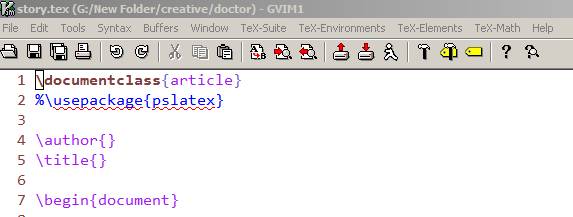
These menus are your standard IDE like features – for example options for inserting packages, or snippets of code for special environments and etc.. A lot of the entries come with predefined key-bindings which make your life much easier. For example:
- To compile your file do: \ll
- To view compiled file do: \lv
You can set the preferred format for both options above by invoking :TTarget. It works like a charm both on Windows and Linux when I tried it.
VimLaTex also uses an interesting concept of placeholders. Whenever you use it to generate snippet of code, it will put funny looking character sequences inside of it. They may look silly until you realize how useful they are. For example let’s say you want to insert a figure:
\begin{figure}[h]
    \centerline{\psfig{figure=«eps file»}}
    \caption{«caption text»}
    \label{fig:«label»}
\end{figure}«»
The placeholders are there to make your life easier. When you press Ctrl+J vim will jump to the first «» delimited sequence and select it. This way you can just type over it. Press Ctrl+J again (while still in insert mode) and you will jump to the next one. How awesome is that?
If you are a Vim lover who also happens to use LaTex or a LaTex user who loves Vim definitely check this one out.
“The power of Emacs comes from what it can do. Vim’s power stems from what it does.”
I think I just achieved enlightenment. What a great piece of insight.
So wait… what do you do if you just want to type “yyp”?
Honest question – I’ve never had cause to use any text editor more complex than Notepad (I know, not really a text editor in the same sense, but you know what I mean)
btw, duplicating a line is a single keypress (ctrl+d) in notepad++ or visual studio with c++ keybindings.
@Paul: :D
@Matt`: Oh, you first enter the edit mode by typing i. Once you are in edit mode you can type normally. Once you type something you hit Esc to go back to command mode where you can use single keystrokes to perform various functions.
@Mirko: Neat. I didn’t know that. A lot of IDE’s use Ctrl+D to mean “comment-out the highlighted block” though so this is going to be confusing. :P
Still, in Vim I can apply similar philosophy for selecting and copying whole paragraphs or functions. For example y}p will duplicate the whole paragraph. y2}p will duplicate the next paragraph and etc…
Luke, I don’y believe that VIP mode has been current since the 90’s ;). Currently what is in use is viper, which is more complete and more configurable, (it makes it easier to access Emac’s standard feature set while in Vi mode) In addition, there is a nice patch: Vimpulse, which does a nice job imitating Vim, not just Vi the difference is tangible any serious Vim user (such as myself.)
Also, I probably wouldn’t use y}p to duplicate a paragraph, as it won’t work if you start with the cursor in the middle. You’d do better to say {y}p, or maybe {v}k$yP if you want to preserve the last blank line. Of course, this starts to get complicated, so you might want to use nmap to map it or something:
:nmap ^z^a {v}k$yPOld thread, but I’ll put in my 2¢ anyway. Another way to select a paragraph is to use visual mode. From anywhere in the paragraph (in normal mode) type: vipy That stands for visual interior paragraph yank. Then just move the cursor to the line above where you want to put the paragraph and type: p to put it.
@tropicflite: Oh wow! Thanks! This goes directly onto my vim cheat sheet!
I really like Vim’s modality, it makes navigation through your document and moving text around so easy (in contrast to, say, Emacs, which I have decided to give a try recently). For me, these features are way more important than all those macros to speed up the insertion of LaTeX commands and environments. This is exactly why VimLaTeX is not up to my expectations. What I find really annoying about Vim (and this is not tackled by VimLaTeX) is its paragraph formatting. I do not like to use soft line wrapping, so I always format my paragraphs manually (that is, I have “t”, but not “a” in my formatoptions and use gwap to format the paragraph I am currently in). However, Vim’s paragraph formatting is not aware of LaTeX syntax, and there seem to be no easy way to make it be (there is an option ‘paragraph’, but it is useless). I tried a few scripts that intend to rectify this, but they all suck, so I am thinking about writing my own. How do you deal with this issue? Simply insert more blank lines? Emacs’ paragraph formatting is, by the way, excellent. Why can’t it be re-implemented in Vim script?
Oleksandr,
I’m seeking exactly what you describe: a VIM formatting script (e.g., for a “gwap”) that is LaTeX aware (e.g., formats text but leaves equations intact). Like you, I’m a former Emacs user. I agree that its LaTeX formatting commands are superb. Please let me know if you progress with this…
Luke,
I used VIP mode in Emacs for many, many years — modding it more and more so that it resembled VIM, until I gave up three years ago and just switched to VIM.
–Marc
Marc,
I must admit that meanwhile I gave up and converted myself to Emacs. I still think that vim is a great and damn elegant editor, but somehow Emacs does better job for me.
@tropicflite: You could save moving to the line above by just typing P instead of p
Awesomeware. Thanks! I was trying to find how to jump to the blocks and couldn’t find it in the manual. Cheerio
Pingback: links for 2010-09-30 « Where Is All This Leading To?

@ astine:
if you use yap it will Yank A Paragraph for whatever paragraph you happen to be in (no matter where you are in it. You can also do stuff like ya{ which Yanks A {-enclosed block (including the delimiters (‘{‘ and ‘}’)). ya( Yanks A parentheses-enclosed block.
doing yi{ or yi( is Yank Inner X-enclosed block, which yanks exactly what ya{ or ya( does except it excludes the delimiters.
Go crazy and combine it in new and interesting ways. ci” Changes Inner “-enclosed block. Super handy!
Hi,
I want to advertise VimLatex-Suite alternative which is AutomaticLatexPlugin (ATP): http://atp-vim.sourceforge.net/ It’s main feature is compilation in background which works under Unix (Linux and MacOs), but unfortunately due to limitations of vim on Windows this feature is not working. Though since most of it is written in VimL and Python most of the features will work on Windows as well. See the feature list here:
http://atp-vim.sourceforge.vim/features.shtml