Would you be able to survive one full day without using the X server? Linux offers us a wide assortment of CLI based tools which use curses and/or framebuffer for functional user interfaces. There is no reason why you shouldn’t be able look up stuff online, read your email, look at pictures, watch movies and listen to music as you are trying to configure X.
I was inspired by this post on Motho ke motho ka botho and decided to compile a list of useful command line applications myself. I will break them down into categories so that we can cover all the bases. If I’m missing something, or if I omitted some cool applications please let me know.
Web Browsing
The biggest problem in living without X is web browsing. You will be limited to text browsers, which generally do not support CSS and do not play nice with AJAX. The good news is, that most of the AJAX heavy web-pages now have mobile versions which are surprisingly text-browser friendly.
There are quite a few text browsers out there but I will recommend one:
Elinks [elinks.or.cz]
Why elinks? Because it supports both frames and tables, displays nice colorful output, and works great with mouse. Of course you can also use Lynx, Links, or w3m but in my experience elinks beats all of them hands down. Here is how my page looks in Elinks:
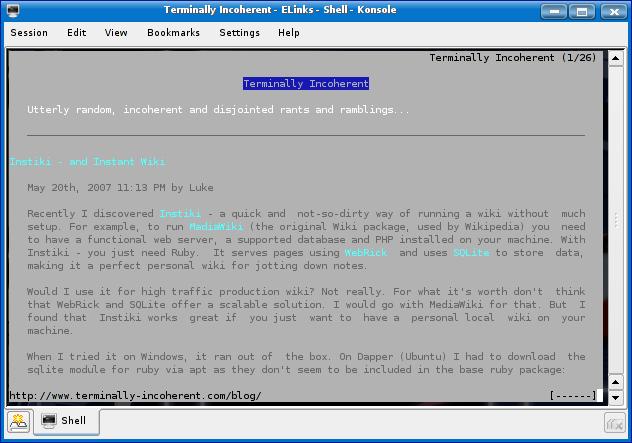
There also seems to be a framebuffer browser out there called Zen but it is a bit unstable no longer in active development.
If you are a gmail user like me, you are in luck. Google has a javascript-less version of their interface which actually works beautifully in elinks:
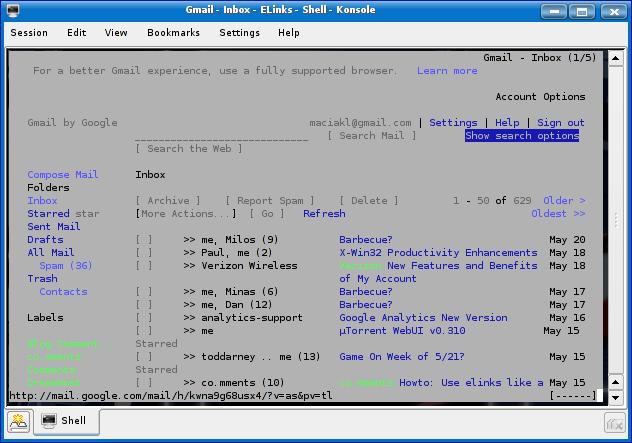
Neat, eh? For everything else there is Mutt:
Mutt [mutt.org]
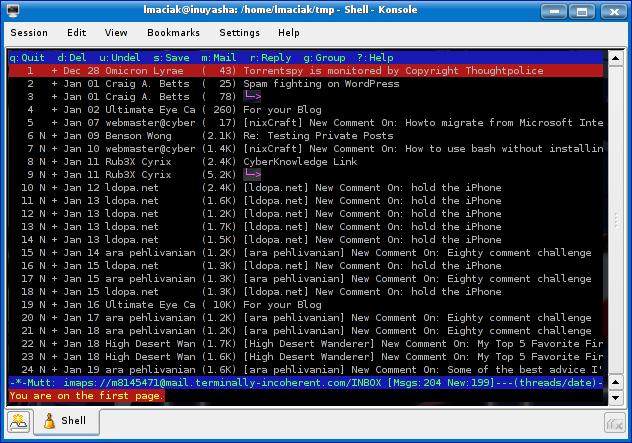
I previously covered Mutt several times, showing you how to set it up for IMAP and how to send out emails without full blown sendmail or exim setup just using basic SSMTP. There is also Pine which is a damn fine mail client too – if you can deal with editing your messages in pico.
Chat
Chatting without X is pretty easy. It depends on what you are into though. For example, if you are a GTalk user I can recommend the excellent Freetalk which I covered before:
Freetalk [gnu.org/software/freetalk]
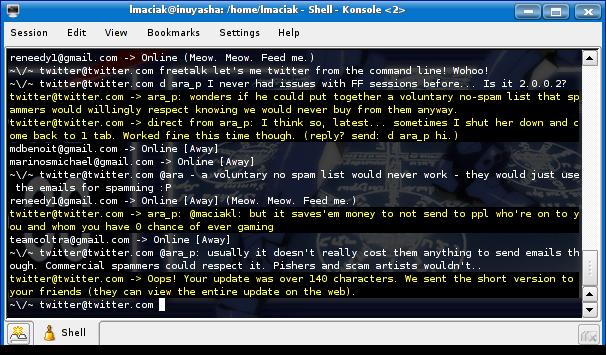
If you are on AIM, then naim will probably be the tool for you:
Naim [naim.n.ml.org]
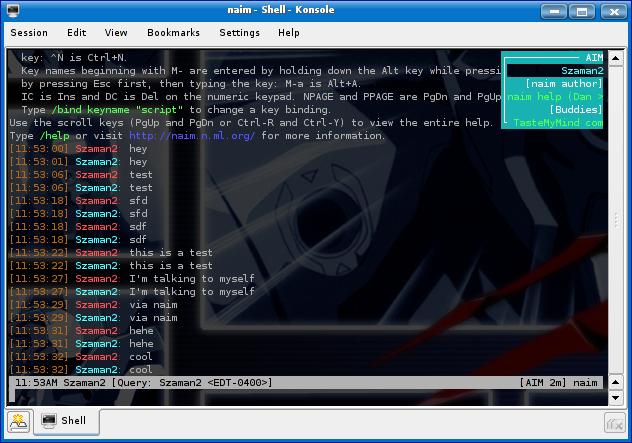
Naim is a little bit funky but once you get used to it just works. It also supports ICQ and IRC protocols. Of course if you want full blown IRC support, there is probably no better client than irssi:
IRSSI [irssi.org]
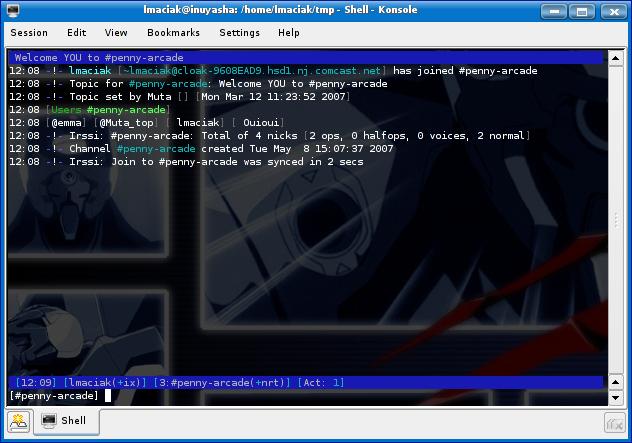
It is a bare bones but full featured client. I don’t use irc that much, so I can’t tell you how good it is, but it seems perfectly functional – especially if you are a hard core irc junky.
Reading RSS
If you are like me, you subscribe to way to many RSS feeds. Unfortunately neither Google Reader nor Bloglines works in elinks (or for that matter any text based browser) so we have to rely on local clients if we want to survive without X. I recommend raggle:
Raggle [raggle.org]
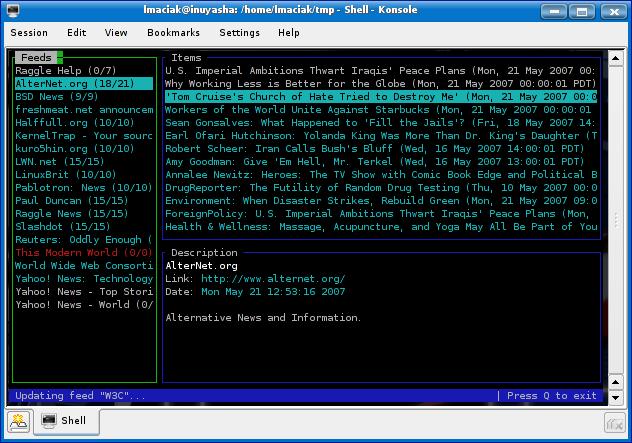
Raggle has a clean and intuitive interface, is fast and takes up almost no memory. Perfect for a day without X. Go ahead, import your OPML file using a command line switch, and give it a go. You can also try Newsbeuter.
Btw, that feed list in the screenshot is the default set you get after installation. My feed list is way bigger. ;P
File Management
When you are not browsing, chatting, reading feed or writing emails you probably move around files on your hard drive. Midnight Commander will make this task easier with the classic Norton Commander like interface:
Midnight Commander [ibiblio.org/mc]
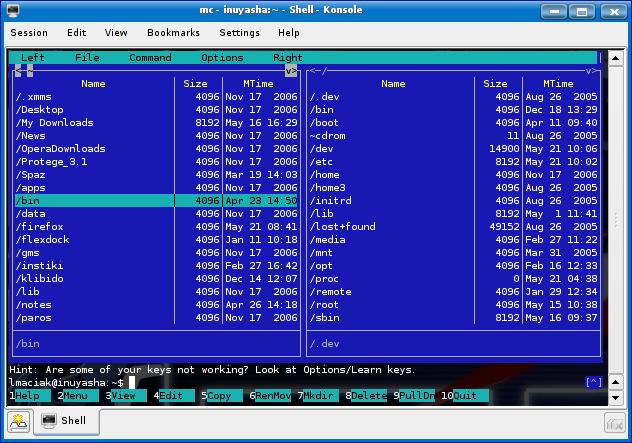
You young whipper-snappers probably have no clue what Norton Commander was – but I grew up on it. Whenever I use MC I feel nostalgic for the good old days.
Viewing Images
So let’s say you are living your one day without X and someone sends you an awesome picture. For example it might be a picture of a cat with a caption (ZOMG! Invisible bike!). Or maybe it’s one of those demotivational posters. Hell, it can even be some dancing bunnies!
So what do you do? You open it with a framebuffer image viewer like zgv of course:
I have no screenshot for this one because you can’t run it in X, but I can confirm it works. So you will never be without your cat macros!
Watching Video
Sure Luke, but how do I watch my p0rnz you ask? I haven’t personally tested it, but it seems that both Mplayer and VLC are capable of framebuffer output. How well do they actually work in that mode – beats me. Maybe at some point I will test them out, but at this point I don’t have any solid recommendations beyond that.
Text Editing
If you use Linux, you should already have a near religious attachment to a text editor that can be used without X. There are essentially 4 kinds of Linux users: vim/vi users, emacs users, users who can use both editors, but neither of them well, and n00bs. And guess what – if you think that you don’t fit in any of these categories, you are a n00b. Personally – I use both, but I’m more familiar with vim than anything else. Here are my recommendations:
VIM [vim.org]
Emacs [gnu.org/software/emacs]
Playing Music
The fact that you are not running X should not prevent you from listening to your favorite t00nz. Cplay is a lightweight audio player that is perfect for our X-less day:
Cplay [mask.tf.hut.fi/~flu/cplay/]
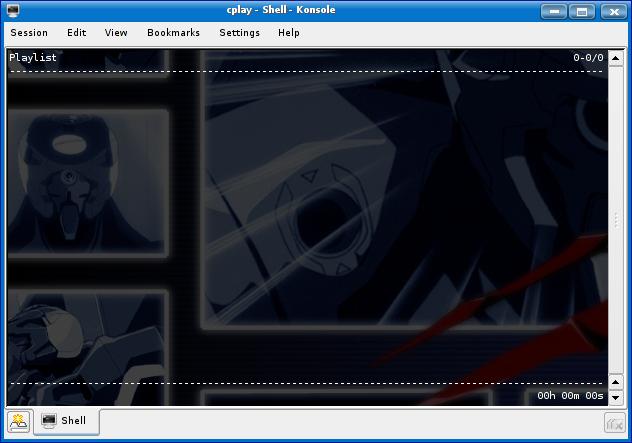
If you struggling with it, there is an awesome overview of cplay here.
Btw, you can always control your audio volume with alsamixer (if you have ALSA, and you probably do – you have alsamixer installed).
P2P
Luke! I has no Toonz! How I get some without X?
Well, it’s easy my friend. You can do it with rtorrent1:
RTorrent [libtorrent.rakshasa.no]
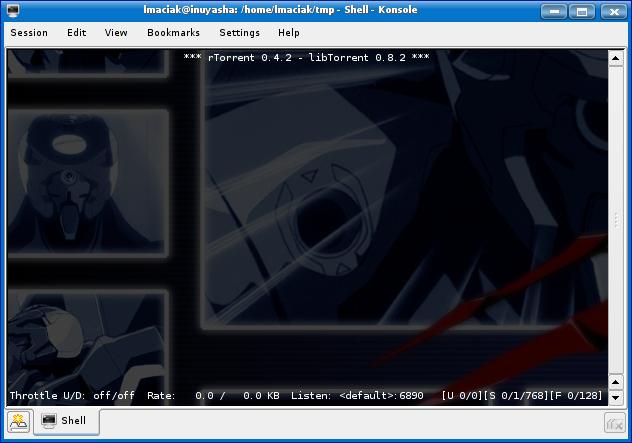
It’s yet another nifty curses application with negligible memory footprint. RTorrent can easily compete with the windows based uTorrent for size and memory. Unfortunately it is somewhat counter intuitive using Emacs like key bindings. The learning curve is a bit steep, so here is a nice primer to get you started.
Window Management
Yes, you heard me right – window management. The fact that we are not using X does not mean that we can’t have windows. Twin is a nifty curses app which will open sub-terminals inside a curses environment:
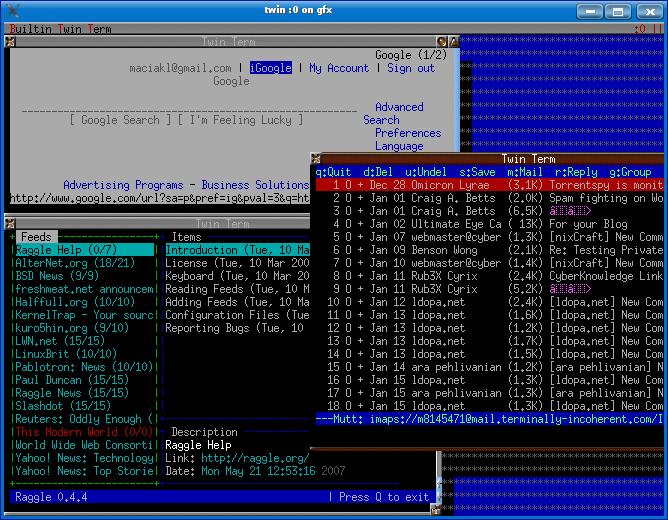
Twin actually stands for Textmode Window Environment which is exactly what it is. As you can see from the screenshot, it will allow you to have elinks, mutt, raggle and essentially any other application I mentioned here today open on the same tty. How awesome is that? It removes one of the very annoying issues that we face when working without X – the inability to have multiple “windows” open on the same screen-space at the same time.
Will I actually attempt to survive a day without X? Maybe I will at some point. And if I do, I will definitely blog about it, and tell you about my experience. But it won’t be today because I actually have some relatively time sensitive work to do. ;)
Maybe we can all try this together? Let’s set a date (preferably on the weekend so we don’t struggle at work) and let’s try to survive a day without X. Let’s make it an annual linux geek holiday or something. :mrgreen:
1 – I neither endorse nor condone downloading music. If you are downloading legally, then more power to you. If you are sharing without permission – make sure you don’t get caught.
Note:
If you want to translate this text, please go ahead as long as you give me credit and link back to this post. This work is published under Creative Commons, Non-commercial, Share-alike license.

Y HALO THAR Digg users! Thrilled to have ya here. :mrgreen:
[tags]x, a day without x, curses, ncurses, rtorrent, cplay, twin, elinks, raggle, vim, emacs, zvg, mplayer, vlc, midnight commander, mutt, freetalk, naim, irssi[/tags]
[quote comment=”4551″]Is there any way watching videos as a non-root user? Mplayers requires root usage. >.[/quote]
If you use fb, try chmod 777 /dev/fb0 (or fb something else) and it’s done. Justo mplayer -vo fb videofile.somethingelse
I just remembered this one . . .
Yes, watch Star Wars without needing aalib installed!
Just open a telnet session to towel.blinkenlights.nl and enjoy the show!
Pingback: Un giorno senza occhiali a Raggi X « pollycoke :)

Sorprendente, realmente. Nota: creo ser libre de expresarme en mi idioma
Que buen post
I use the command line a lot myself. Interesting list of applications. MPlayer works well on command line only, VLC I havent tried but when I get time will definately look into it.
Thx for a great article.
Thats a nice collection, i wouldn’t have even thought any applications existed for some of the listed purposes.
I found it :) Nice dude…
I digg the article (no pun intended)
Pingback: Un indovinux mi disse by lorenzo lombardi’s blog

I lived for at least a month with no xserver when I first tried linux… Gentoo was a dumb choice for a first distro :) especially I didnt partition my drive for any other os.
CLI != curses, in a Command-Line Interface, you type command sentences. On Unix, the typical example is the shell. Other programs also have a CLI, for example, the gdb debugger, various database systems, etc.
You might be surprised that there are quite a few people who know and can handle BOTH vi AND emacs (and even ed) very well, thank you very much.
[quote comment=”4577″]You might be surprised that there are quite a few people who know and can handle BOTH vi AND emacs (and even ed) very well, thank you very much.[/quote]
Ed is the standard editor! Hehe.
Pingback: ComputerPhreaks Blog » Blog Archive » For those of you non-Windows weenies, try a day without X and see if you go crying home to mama

too bad you were running X at least to take those shots with konsole :(
you coud have used a console and grabbed the screenshots with fbgrab :).. (ok somebody already told you about it)
like this one
Among www browsers I would suggest links as jangelh and others suggested already.
Among pic viewers fbi (suggested already… ARGH!)
Well what’s left?
mame or advmame with svgalib to play games! Nobody talked about it :)
Good article. Don’t forget about other console programs, such as links2, screen, mplayer with -vo aa or -vo caca. Continue exploring ttys :)
Another classic command-line program is siag, aka Scheme-In-A-Grid,a fine spreadsheet program. It has an X version to go with it and is a close cousin to Pathetic Writer (pw, xpw), which is a basically useful but not feature complete word processor.
If people we’re lisp snobs they’d have extended siag to be the open source office suite instead of rewriting from scratch in C/C++/Java.
I loved:
Amen, brother.
And hey, have you ever used vile (vi like emacs)? I do love it so…
Pingback: Tuxiano » Blog Archive » Un giorno senza GUI

Since we already have mplayer, why not use it for audio on the console? It handles playlists and netstreams, including windoze and apple formats. It has search feature and variable-speed playback for local files. Listen to lectures, downloaded ebooks and podcasts at a high rate of speed, get it done quicker! Also great for music and net-radio!
Pingback: FOSSwire » A day without X

Pingback: A day without X « News Coctail

nice article!
I was going to add “screen” and “bitlbee”, but other folks beat me to it.. I spend so much time accessing my machine via ssh that I have a .screenrc that magically sets up 10 windows with appropriate apps in the expected windows for me.. yay!
For music I’d just use ogg123/mpg123 .. who needs complicated apps..
Jess
Pingback: What if You Spent a Day Without X11? « Linux and Unix Links of interest

Pingback: Hostgator » Blog Archive » A day without X

Pingback: meneame.net
Pingback: albertferran » Un dia sin entorno gráfico

Elmo is another text based email client option that may be more intuitive for some people to use than mutt.
From the man page: “Elmo is a feature-rich console mail client for UN*X power users. It integrates functionality commonly realised by separate pieces of software in other mailers.
Elmo features threading, Bayesian mail filter, colors, MIME (including encoded headers support) maildir and (partial) mbox support.”
here are a few cli tools I find useful, sometimes stating the obvious ones but still they are useful.
– screen (fullscreen window manager multiplexing physical terminal between several processes)
– whereis (locate binayr/source/manual for a command)
– whatis (display a command man description)
– apropos (search man descriptions)
– ncftp (ftp client)
– wget (non-interactive downloader)
– curl (URL transfer tool)
– shred (secure delete)
– tcptraceroute (name says it all)
– imagemagick (package of images manipulation tools)
– iptraf (traffic monitor)
– cryptcat (netcat with encryption support)
– watch (run a program periodically)
– gpart (partition tool)
– multitail (tail supporting several files at once)
– bitlbee (IM2IRC gateway)
– mpd (audio player)
Pingback: trabajando en modo consola/terminal ... nada de graficos « hombrecero

What a pointless text, for who are you people writing this anyway. What is that comment about editors and noobs, and what is the fascination with words that end up with Z.
Post about not running X (for a “day” LOL, get a clue) and the posting your konsole (TM) images.
What we are dealing with today is a total moronisation of formerly good Unix like operating system.
Idiot WIMP (l)users are everywhere, I will hide in my troll cave now, because I’m afraid of a deranged Ubuntu sect members to try and hunt me down.
‘Nuff said. For starters it’s a nice article and gives some clues about how to come along without requiring X. So, for the average user, it makes quite some sense. For the ones like us, using *ix based OS for more than a decade now, it’s of course way too “wimpy”, but who cares – i think, dear Mr. guru, have fun in your Xless world but don’t judge about the ones trying to make the console a bit interesting to the click-and-forget generation.
Personally, i only use X because my business requires it (ok, some tools i need for my business require it, but it doesn’t make a difference :) and almost everything that is available via some (n)curses platform is used with it where possible (e.g. mutt, centerim, w3m and others)…
Besides that – yes, CenterIM should have been mentioned, because it’s a great multi-IM client :)
Greetz (SCNR) and tty at 11,
Frank
I think screen deserves an honerable mention. Since I basically do all my work over ssh it’s a real godsend.
Hello everyone!
I have now installed mpd and are eager to learn, but how do I use it? How do I tell it to play every file in a folder, how do I change to next/last, what kind of files can it play etc etc.
Too bad Herrie didn’t make it into this article. You should really try it. Like CPlay, Herrie is a light-weight music player. The only difference is that it doesn’t spawn any external applications like ogg123, etc. which has a few advantages:
– It’s even lighter; less process spawning when just switching tracks
– It allows the entire application to chroot itself, without needing the binaries while there.
The upcoming release, 1.8, will be released on the first of July and will be even more light-weight than 1.7. 1.7 still uses libao on a lot of operating systems for audio output, while 1.8 has native ALSA and Apple CoreAudio support, which makes it even lighter.
there is also `fbgs’ for displaying PDFs. It comes with `fbi’ (which is for displaying images)
Pingback: A Day without X — ScreenFace for UBUNTU « My Cup of UBUNTU

very nice stuff…;)
btw…i use :
centericq – im
mp3blaster – mp3+ogg player
links2 – browser
vim – editor
thx..
Hi, i would translate this article in italian language.
The article will be published in this blog:
linuxiano
Of sure i will citate the original post and i’ll attribute the merits to you.
thx…
bye
#linuxiano
Pingback: Un giorno senza X… « Note su LINUX

Check this software for managing text-mode apps…
I made it myself…
Its only for UBUNTU users…
Download and install the latest version from…
http://screenface.66ghz.com
Pingback: Kick Bill » Blog Archive » Necesitas las X, pero no tanto :-)

Pingback: MicroTeknologias 2.0 » Un dia sin X

[quote comment=”4536″]In my widescreen laptop (1280×768) I can watch widescreen videos (e.g. 624 x 352) with the following:
#echo mplayer configured for console fullscreen playback
mplayer -vo fbdev -fs -zoom -aspect 1.3333 -sws 3 -vf scale=1000:700 movie.avi
It is somewhat obscure because I have to trick mplayer since it thinks that My screen is only 1024×768…[/quote]
Isn’t there some sort of way to tell mplayer what your screen resolution is at the command line for when you’re using a video output method where it can’t be determined as easily (e.g., fbdev or fbdev2, etc.)? I’m not entirely sure, but I think its manpage says something about -screenh and -screenw (height and width) options where you can tell it what the number of pixels that your screen resolution is.
And what
[quote comment=”4536″]In my widescreen laptop (1280×768) I can watch widescreen videos (e.g. 624 x 352) with the following:
#echo mplayer configured for console fullscreen playback
mplayer -vo fbdev -fs -zoom -aspect 1.3333 -sws 3 -vf scale=1000:700 movie.avi
It is somewhat obscure because I have to trick mplayer since it thinks that My screen is only 1024×768…[/quote]
Isn’t there some sort of way to tell mplayer what your screen resolution is at the command line for when you’re using a video output method where it can’t be determined as easily (e.g., fbdev or fbdev2, etc.)? I’m not entirely sure, but I think its manpage says something about -screenh and -screenw (height and width) options where you can tell it what the number of pixels that your screen resolution is.
By any chance did you know what is the difference between the “zoom” and the “scale” functionality is? Thanks.
Great Article, I love Unix without X! I also reccomend CenterICQ for messenger
Great to be a console warrior. A little contribution: My favorite console application is “vifm”, a small but powerfull midnight-commander-like file manager that works with vi/vim key bindings. Cannot work without it anymore.
Pingback: A day without X « Linux and Unix Top News

Pingback: Jatecblog » How To Save Energy on Any Computer

If you are interested in more information about rTorrent, check out this study. It shows the weaknesses of the bittorrent protocol and modifications you can make to rTorrent. http://calomel.org/rtorrent_mods.html
Pingback: IppatsuBlog » Programmi per console: un giorno senza X

nice article, though i would like to see one on longer term usage of the commandline in preference over x
Nice article.
I’m currently using centericq and irssi for IM. I prefer these to graphical IM clients even if im running in X. Plus side is ofcourse that I can use them remotely via ssh.
Mplayer rocks on command line and I use mplayer -vo fbdev quite often, which works just perfect. No different than watching movies in X.
Caca ascii output is just fancy and not very useful when you’ve already got great quality got framebuffer video, but I have to admit it looks cool. click here for screen
Yeah, the ASCII thing is a really cool trick you can use to impress your friends but I can’t imagine actually watching a movie this way.
CAPTCHA: sudo… interesting
Anyway, could you do an article on directfb on Intel, NVIDIA, and DAAMIT?
Thanks
Yes this certainly good idea, with such set of the programs, x-server in outline not it is necessary!
tried links2?? http://links.twibright.com/
it support framebuffer so you can browse the web with full graphics.
or nanozilla under nano-X?
http://alllinuxdevices.com/news_story.php3?ltsn=2000-10-18-002-03-NW-D V
I’m coming late to the discussion, but I struggled with the command line RSS aggregators. Turns out that Bloglines Mobile page works well in elinks. Be forewarned that unless you explicitly disable it from your regular bloglines page, it will run your outgoing page links through Skweezer to optimize the download time.
Links2 can display webpages with framebuffer, so you’ve got all your images and everything.
I keep promising myself that, one of these days, I’ll try running my computer without X. Also note that you can play individual audio files with “play” – it comes with sox. Just install sox and then type “play audiofile.mp3” and it will play “audiofile.mp3”.
P.S. I’m using IE on Windows XP but only because the head office has stopped Firefox from working :-(
Yo tengo Xubuntu y FreeBSD en mi Dell Inspiron 1420n y en mi FreeBSD no tengo entorno grafico. Pero aunqué técnicamente puedo hacer todo sin mi entorno grafico, no me gusta por el simple hecho de que me gusta cacharrear con DE’s (mi preferido es Xfce 4.4.2) y me gusta el compiz-fusion. Además no logro entender cual es el interes en tener los entornos más aburridos y feos en nombre de la “productividad” y el ser “profesional”.
Ahora para los interesados conozco un par de editores de texto que funcionan bajo la consola.
Vigor
Jed
Le
Jove
ee
Y si tenes el pico (nano no lo incluye) también tenes un gestor de archivos que funciona como el pico y se llama pilot.
Dude! Ever heard of not making screens of window decorations? ^^
Also late to the party, but I want to mention a few things that no one else has.
– None of the curses-based RSS aggregators (snownews, newsbeuter, raggle, nrss) I’ve seen meet my needs. I’ve settled on rawdog instead. It generates a local webpage than I can then read with a text-mode browser (or with Firefox if I’m working in X). Easily automated with cron. It uses Mark Pilgrim’s feed parser, so it supports just about everything that’s out there, and since it defers formatting and display to the web browser, it doesn’t have some of the shortcomings of the aggregators that try to do this themselves. IMO, a fine example of doing one thing and doing it well.
– I use dvtm to tile the terminal or console window. Using it, for example, I can view a manpage while typing in vim. I find this to be a much more productive way to work than switching between virtual terminals in screen or between tabs in a terminal emulator. (Yes, I know screen supports split windows, but dvtm’s approach is nicer.)
– For downloading podcasts, I like podracer. But the original bashpodder is OK too.
– For backups, I use rdup.
– Someone already mentioned vifm. But I want to add my vote for this lightweight alternative to the more popular Midnight Commander.
Lmao rickroll. nice post
I’m quite surprised that noone mentioned a usenet client: slrn
Also, can someone recommend a minimal USB distro on top of which I could put all these programs?
I haven’t tried it myself, but you might want to consider ttylinux.
If that’s still not small enough, you could recompile the userland utils to use ucLib or dietlibc. (I haven’t tried that either, but it’s on my todo list.)
Thanks for making my geriatric laptop useful :)
Man, that is so sweet, I get almost everything that I am looking for. I get a fairly old Laptop, That is exactly what I want to do with it. Instead a base Linux Distro, and Run it purely in CLI. I will organize the post, and list out all the software that was mentioned.
One thing I would like to ask is that, is there a good CLI Graphical/Scientific Calculator? What I mean by Graphical is just like a way to making plot / graph. If there is That would be perfect.
awsome Post
[quote post=”1601″]One thing I would like to ask is that, is there a good CLI Graphical/Scientific Calculator? What I mean by Graphical is just like a way to making plot / graph. If there is That would be perfect.[/quote]
Well, there’s GnuPlot. I think you could redirect the output into an image, and then view the image using one of the CLI image viewers that were mentioned somewhere in this post.
[quote post=”1601″]One thing I would like to ask is that, is there a good CLI Graphical/Scientific Calculator? What I mean by Graphical is just like a way to making plot / graph. If there is That would be perfect.[/quote]
If you don’t want accuracy but just to look at the general trend, use the dumb terminal option on gnuplot:
http://t16web.lanl.gov/Kawano/gnuplot/misc3-e.html
I made a list that listed out all the software that is mention on this page, Just so people wouldn’t need to dig for them.
and one quick question, is there a nice software that do Latex in CLI?
here is the list
Linu (Linux without X)
[quote post=”1601″]and one quick question, is there a nice software that do Latex in CLI?[/quote]
Yeah, it’s called Emacs ;) No, seriously – it’s a pretty good LaTex editor. :)
Thanks so much Luke
Ceni I hear is good for wifi, splitvt will split one tty into … two… no more…
And dvtm, while I can’t figure it out, looks like ratpoison for the console.
Sweet, I’ll have to try that sometime :D
I am trying to get ubuntu onto my iBook and I apparently needed to use the alt. Install CD so untill then I am using X on my iBook, I have been using your programs to help me along (luckly most are in the ubuntu res so i only need to apt get and not compile)
I thought of something else to add, nano! It’s easier to use than vi(m) or emacs, I don’t know why it’s not on there. (it’s for the n00bs)
if you are not too partial to naim, finch is a great ncurses based interface based on purple ( read: pidgin / gaim ). one of my favorites. also, for images aalib is just great, and it has a great video out device for mplayer that real-time encodes the movie to text.
cheers man, great article,
Tag
+1 for finch :) It’s very similar to Pidgin (not only based on it but made by the same people). It’s the best choice, and multi protocol :)
screen for sure!
strings for reading MS Documents
pdf2html for converting pdf files to html then use lynx etc
finch for msn and irc.
When I tell people I can’t drive a standard transmission car, many people laugh. The funny thing is, I’ve been a computer nerd my entire life, and a command line person. I believe many people are “trained” to think the GUI == The Machine.
It’s healthy to escape outside your comfort zone for a while. For the record, I’m a big Cisco guy, and much of the power of their equipment is on the command line. Sure the GUIs are getting better, and are nice and fun to use, but you never know when you’ll need to drive that manual transmission in an emergency.
I think I could fake it.
thank for the information, really usefull
but I have my own choise for non-X application
this is the list
web browser:lynx
download manager:wget
email client:pine
mp3 player :Mpg123
Dude, did you forget screen?
^ IMHO twin is better and easier to understand than screen. I never understood screen that much TBH.
Thanks for the suggestions.. sounds like a fun adventure!
why manage all of those programs? just master emacs. mail, web browsing, editing, music player, irc/chat….all within one program with which i can modify with elisp
place emacs inside tmux and you get session persistence too
p.s. no matter what chat client is used, btlbee is the way to go
This page is awesome, Thanks for putting together a list like this. I too often just prefer the CLI for my Linux machine. I have two machines I use, one with Winders for gaming and the Linux does Web Content filtering, etc.. so the CLI works fine for most things. I haven’t been able to find a ‘clock’ yet for the CLI.. maybe it will give me a reason to code something.
Oh and ‘mp3blaster’ is awesome for playing audio also.
@overcast:
For clock, tried typing in ‘date’?
Sat Feb 13 20:32:07 PST 2010
Or looking for something more featured/customizable than that?
Pingback: Une journée sans X… Partie 1/2.

a day without x sounds amazing, but not for CJK users.
Really amazing the TTY power… I’m looking for a none X Linux distro and find “INX Is not X”, but with a problem, can’t install this distro, any one know if exist a None X distro in order to full install in a HD?
thanks in advance, best wishes.
Carlos
Venezuela
@carlos – try installing debian off of the netinstall disk. it gives a very basic system, without x, and then install what you need, just watch to make sure that you are not installing anything that has x as a dependency
@ rpb:
MINITEL !
X Sucks. Linux Terminal all the way! Wooot!!
:P I feel mildly offended that I read an email from my inbox, then had to follow the link, then find out how to see newest comments… all just to find someone making a comment with no value to the post.
but alas, it reminded me to see whats up with TI
You might also be interested in Direct Rendering Infrastructure (DRI/DRI2) which is faster than pure FrameBuffer, as it is allows for direct hardware access for usermode apps.
DRI/DRI2 are part of X.
DRI links: http://dri.freedesktop.org/wiki/Links — includes OSes, Linux distros, cards supporting DRI.
DirectFrameBuffer (codenamed DirectFB) is just a replacement for X which seems to have little amount of perspectives when compared to X DRI. People say that DirectFB only supports old video cards.
I think we need TextGNOME to be implemented! :)
(Text/console mode variant of GNOME with unified textmode windowing toolkit.)
I actually have beenn doing this since easter but lack of js enable browsers has been reason why I couldn’t comment here. Using links2 with graphics was pretty easy as was using mplayer -vo fbdev and everything else I used was already console application. (I used links2 as my main browser even before this. now I’m commenting using links 2.0 (it had js support))
Oh. The links was 2.1pre21 instead of 2.0. I had to do one tweak to make it not get any gziped pages it can’t decode. Also tips for those who want to seriously live without X:
1. Compile links2 with graphics. Just do it. You’ll thank me.
2. Compile another links2 (version 2.1pre21 or older) with javascript supported. (Or if you don’t mind your main links being 2.1pre21 compile this one with graphics and forget the first one.) Remeber to add this line:
add_to_str(&hdr, &l, “Accept-encoding: plain\r\n”);
after this line:
add_to_str(&hdr, &l, “Accept: */*\r\n”);
in http.c
3. Get version of mplayer that can output to fbdev.
4. Learn linux shell completely.
5. Create shell scripts for common things. It may seems stupid at first but it will make your life easier. For example I have script that extracts sound out of mp4 wideos youtube-dl produces using ffmpeg and then uses lame to encode it in mp3 format.
It isn’t as hard as you might think. I’m mostly doing this because my computer has 64MB of RAM but actually this is nice experience I can recommend to anybody who knows linux well.